Get customs docs and invoices
Retrieve CN22, CN23 customs docs and commercial invoices for international packages. Documents are auto-generated post-allocation with the Customs Docs endpoint.
Overview
This page explains the various ways in which the Ship platform can return customs documents and commercial invoices using our API package.
Our Customs Docs endpoints enable you to retrieve the pre-generated documents encoded as base64.
Why customs documents matter
When shipping internationally, customs authorities require documentation that describes the goods, their value, their origin, and the reason for export.
Ship determines which document is required during allocation and makes it available via the Customs Docs endpoints.
When shipping internationally, Ship will automatically determine if customs documentation is required for a consignment. The Consignments API can automatically generate CN22, CN23, or Commercial Invoice documents in PDF format and will determine which document is appropriate for any allocated consignment.
Following the UK’s departure from the EU, certain additional consignment properties must be passed in order to generate customs documentation for UK-originating international consignments. In addition, certain carriers have their own data requirements that UK-originating international consignments must meet in order to be considered for allocation to that specific carrier.
For an explanation of Brexit-related data requirements, see our Brexit Data Guide page.
The Customs Docs API has two endpoints:
- Get Commercial Invoice - Use to return a consignment’s commercial invoice.
- Get Customs Document - Use to return a CN22 or CN23 document for a particular package.
Get a commercial invoice
To call Get Commercial Invoice, send a GET request to https://api.electioapp.com/consignments/docs/commercialinvoice/{consignmentReference}. The commercial invoice is returned for the relevant consignment as a base-64 encoded byte array to be decoded.
Find out more: What is a Commercial Invoice?
For full reference information on the Get Commercial Invoice endpoint, see the API reference.
Get an individual customs document
To call Get Customs Document, send a GET request to https://api.electioapp.com/consignments/docs/{customsDocumentType}/{consignmentReference}/{packageReference}. The {customsDocumentType} can return either CN22 or CN23 documents.
Find out more:
The Consignments platform returns the relevant document as a base-64 encoded byte array to be decoded.
For full reference information on the Get Customs Document endpoint, see the API reference.
Customs documents explained
CN22
What is a CN22?
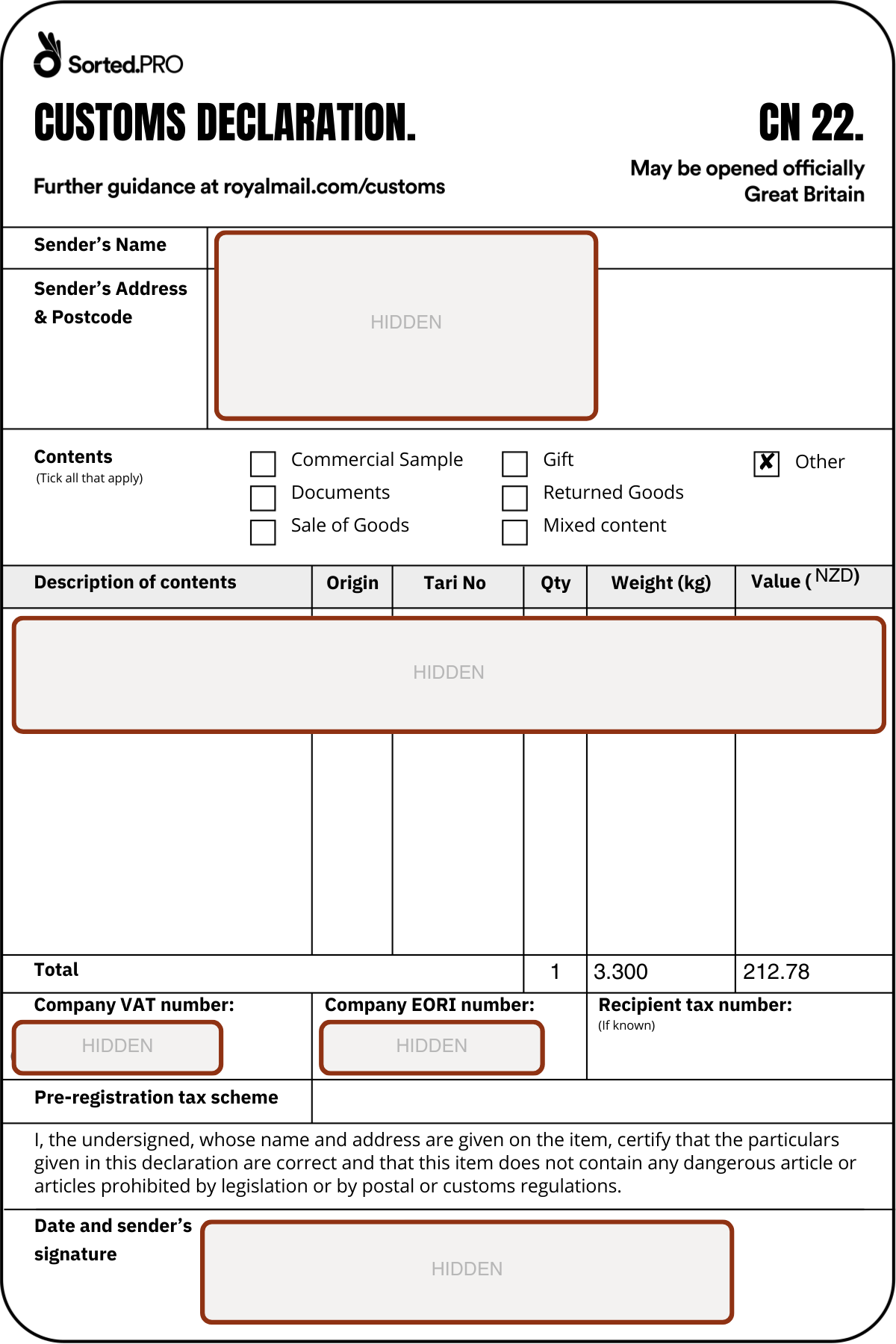
A CN22 is a small-format customs declaration label typically used for lower-value international shipments. It is commonly used when shipment value falls below a destination threshold and the carrier supports CN22 for that route. The label contains a summary of the goods including description, value, weight, origin, and sender details.
Typical use case: A retailer shipping low-value goods (e.g. accessories, samples, small ecommerce parcels) to international destinations where full-page documentation is not required.
Printing dimensions
- Size: 6 x 4 inches (100mm x 150mm)
- Intended printer: Thermal label printer
- Returned format: Base64-encoded PDF (default)
Because CN22 is label-sized, it is usually printed on the same printer as the shipping label.
Example
CN23
What is a CN23?
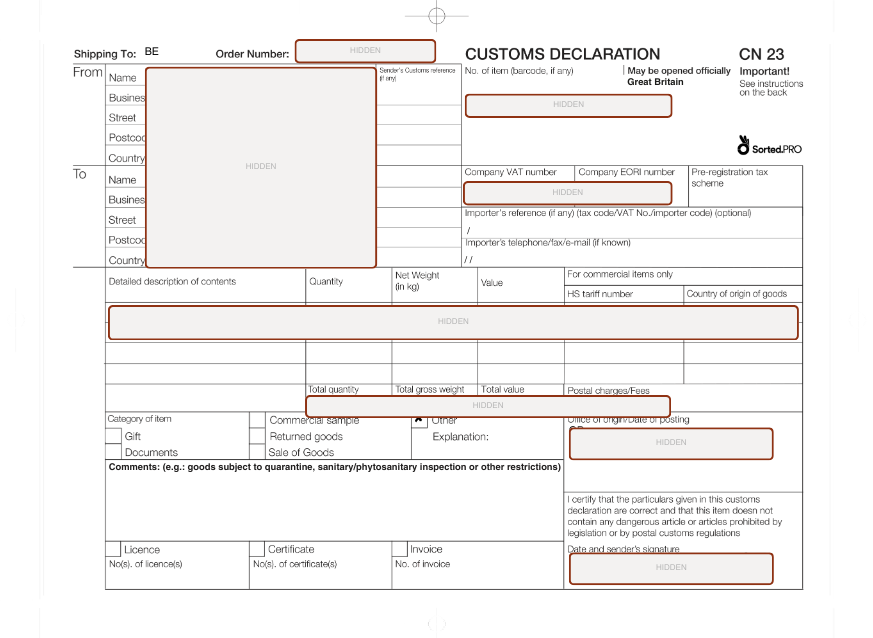
A CN23 is a full-page customs declaration used for higher-value shipments or destinations requiring more detailed customs data.It includes expanded information such as full item breakdown, HS codes, weights, values, and exporter/importer details.
Typical use case: A retailer shipping higher-value goods, multi-line orders, or shipments into destinations that require full customs transparency and tariff classification.
Printing dimensions
- Size: A4 (210mm x 297mm)
- Intended printer: Standard A4 laser or inkjet printer
- Returned format: Base64-encoded PDF
Example
Commercial invoice
A Commercial Invoice is required for many international shipments, particularly when goods have commercial value or are shipped outside customs unions. It is primarily used by customs authorities to assess duties and validate declared values.
Printing dimensions
- Size: A4
- Intended printer: Standard A4 printer
- Returned format: Base64-encoded PDF
Base64 encoding
All customs documents are returned as base64-encoded byte arrays.
Base64 allows binary file data (such as PDFs) to be safely transmitted via HTTP. The document must be decoded before printing.
Typical workflow:
- Call the relevant Customs Docs endpoint
- Receive the base64 string
- Decode to binary
- Send to the correct printer
ZPL recommendation for 6x4 label workflows
For 6x4 thermal printing (e.g. shipping labels and CN22 customs documents), we strongly recommend decoding and generating ZPL wherever operationally possible.
ZPL (Zebra Programming Language) sends printer instructions directly to compatible thermal printers. This provides more consistent layout control and faster processing in high-volume environments.
Benefits of ZPL include:
- Deterministic label rendering
- Faster print times
- No driver-level autoscaling issues
- Reduced risk of margin or layout distortion
PDF-based printing can sometimes introduce scaling or driver inconsistencies depending on operating system and printer configuration. ZPL avoids this by allowing the printer to render the label natively.
Printer routing considerations
Customs documents vary in size, so your fulfilment system should implement document-aware printer routing.
| Document Type | Size | Printer Type |
|---|---|---|
| CN22 | 6x4 | Thermal label printer |
| CN23 | A4 | Standard A4 printer |
| Commercial Invoice | A4 | Standard A4 printer |
Operational best practice
For automated fulfilment environments:
- Retrieve documents immediately after allocation
- Route based on document type and size
- Avoid automatic print scaling
- Log print outcomes for audit visibility
This helps ensure compliance, smoother warehouse operations, and fewer international shipping disruptions.